
Product details
Lenovo Idea Tab Plus Full Specs and Price in Kenya
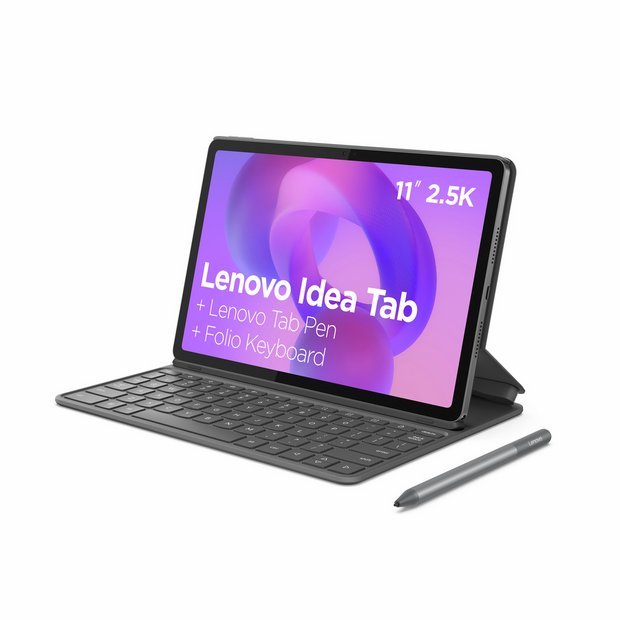
Lenovo Idea Tab Plus with Keyboard and Tab Pen is a versatile tablet designed for a diverse range of users, from students to professionals. Sporting a sleek design that combines portability with functionality, the Idea Tab Plus stands out in the increasingly competitive market of tablets available in Kenya.
This tablet comes equipped with a vibrant display, offering a resolution that enhances visual clarity, making it suitable for entertainment, reading, and productivity. One of its notable features is its powerful processing capabilities, driven by a robust chipset that ensures smooth operation whether one is multitasking or running demanding applications. The device also integrates advanced graphics support, which is particularly appealing to users interested in gaming or multimedia consumption.
In terms of memory and storage, the Lenovo Idea Tab Plus offers generous options, making it a suitable choice for users who require a significant amount of space for apps, documents, and media. Additionally, the tablet operates on a reliable battery that provides extended usage time, ensuring users can engage with their tasks without frequent recharging.
The addition of the Folio Keyboard and Tab Pen further enhances the tablet’s appeal, targeting those who prefer a laptop-like experience or wishing to explore creative possibilities through touch or stylus input. These accessories make the Idea Tab Plus highly functional for note-taking and professional presentations.
In summary, the Lenovo Idea Tab Plus is strategically positioned in the market to cater to a variety of needs, making it an attractive option for Kenyans looking to blend work and leisure seamlessly in a portable form factor.
Design and Build Quality
Lenovo Idea Tab Plus with Keyboard and Tab Pen has been thoughtfully designed to offer both aesthetic appeal and practical functionality. One of its most notable features is the sleek and compact form factor, which enhances its portability and ease of use. Weighing approximately 710 grams, this tablet is relatively lightweight, making it convenient for users who are frequently on the go. The dimensions of 10.5 x 7.5 x 0.3 inches create a slim profile that can easily fit into a bag or backpack, ensuring that it can be taken anywhere without much hassle.
Constructed from high-quality materials, the Lenovo Idea Tab Plus boasts a premium feel that elevates the overall user experience. The use of aluminum in its chassis not only adds to the durability of the device but also contributes to an elegant and modern look. This solid build quality combined with a minimalist design philosophy exemplifies Lenovo’s commitment to producing devices that are both functional and visually appealing. Users will appreciate the smooth edges and carefully crafted surfaces that feel comfortable in hand.
When it comes to color options, the Lenovo Idea Tab Plus with Keyboard and Tab Pen typically offers a selection ranging from classic black to more vibrant hues, allowing users to choose a model that suits their personal style. The device’s aesthetic appeal is further enhanced by its streamlined design, which incorporates subtle design elements, such as thin bezels and a refined finish, giving it a sophisticated appearance. Altogether, the combination of these factors contributes to a positive overall impression of the Lenovo Idea Tab Plus, ensuring that it stands out in the competitive tablet market.
Folio Keyboard: Features and Advantages
The Lenovo Idea Tab Plus is accompanied by a versatile Folio Keyboard that significantly enhances the user experience. This keyboard offers a seamless transition between tablet and laptop modes, making it an ideal accessory for professionals, students, and creative individuals alike. With its lightweight and portable design, the Folio Keyboard ensures that users can easily carry it alongside the tablet, enhancing productivity on the go.
One of the standout features of the Folio Keyboard is its ergonomic design. It is equipped with well-spaced keys that provide a comfortable typing experience, promoting ease of use during long writing sessions. The responsive feedback from the keys facilitates efficient typing, reducing the frustration commonly associated with smaller on-screen keyboards. Whether users are drafting reports, engaging in correspondence, or writing creative pieces, the Folio Keyboard offers an improved and satisfying typing experience.
Battery life is another advantage of the Folio Keyboard. Designed to consume minimal power, it is engineered to extend the overall battery longevity of the Lenovo Idea Tab Plus. Users can go for extended periods without needing to recharge, making it suitable for prolonged work hours or travel scenarios. The combination of a powerful tablet with a well-functioning, energy-efficient keyboard permits a productive workflow without frequent interruptions.
Moreover, the Folio Keyboard boasts additional functionalities that enhance its usability. It may include shortcuts for important functions, which can streamline the overall user experience. This is particularly beneficial for those engaged in creative endeavors or busy professionals who rely on efficiency and speed in their tasks. Overall, the Folio Keyboard is an excellent accessory that elevates the Lenovo Idea Tab Plus, making it an all-in-one solution for various user needs.
The Tab Pen: A Creative Companion
The Lenovo Idea Tab Plus is not just a powerful tablet; it is significantly enhanced with the inclusion of the Tab Pen, which acts as a vital tool for creativity and productivity. The Tab Pen is designed specifically for this device, providing users with a seamless experience for drawing, note-taking, and various creative applications. Its precise tip and pressure sensitivity allow for a natural writing experience, making it an ideal device for artists and professionals alike.
One of the standout features of the Tab Pen is its ability to recognize varying levels of pressure. This attribute is particularly beneficial for artists who require different stroke widths when drawing or sketching. Furthermore, the Tab Pen facilitates tilt and angle detection, enabling users to create shadows and gradients that mimic traditional drawing techniques. This versatility sets it apart from many generic styluses available in the market.
When comparing the Tab Pen to other styluses, it is apparent that the Lenovo offering holds its ground firmly in terms of performance and functionality. While many competing styluses may lack certain features, such as tilt sensitivity or express buttons for shortcuts, the Tab Pen integrates these functionalities effectively, enhancing the overall drawing and note-taking experience. It pairs seamlessly with the plethora of creative applications available on the Idea Tab Plus, encouraging users to explore their artistic side.
Additionally, the Tab Pen’s ergonomic design makes it comfortable to hold for extended periods, reducing fatigue during long creative sessions. The combination of precision, comfort, and advanced features makes the Tab Pen an essential accessory for any user looking to fully capitalize on the capabilities of the Lenovo Idea Tab Plus. Whether you are a professional artist or someone who enjoys doodling, the Tab Pen serves as a reliable tool that can elevate your creative endeavors.
Performance and User Experience
The Lenovo Idea Tab Plus stands out in the competitive tablet market, particularly within the Kenyan landscape where versatility and performance are critically valued. Equipped with a robust processor, typically a Snapdragon series or similar, the tablet offers swift navigation between applications and smooth multitasking capabilities. This performance is further enhanced by a generous amount of RAM, which aids in handling demanding tasks without significant lag, providing a seamless user experience.
When evaluates the camera quality of the Lenovo Idea Tab Plus, it is crucial to note that it houses a powerful rear camera, likely rated at least 13 MP, which delivers impressive image clarity. Users have praised the capability of the camera for casual photography, capturing quality moments on-the-go. The front-facing camera also performs admirably, making it suitable for video calls and virtual meetings, which have become essential in today’s remote working environment.
The software functionality of the Lenovo Idea Tab Plus showcases a user-friendly interface built on the latest Android version. It includes regular updates that enhance security and introduce new features, much to the delight of the users. The addition of Lenovo’s proprietary applications further augments the tablet’s functionality, providing tools that streamline productivity and creativity—particularly in combination with accessories like the Folio Keyboard and Tab Pen.
User experiences and reviews of the Lenovo Idea Tab Plus indicate a high level of satisfaction among consumers. Many have expressed appreciation for its lightweight design, which facilitates portability without compromising performance. Users have reported that it meets their needs effectively for a variety of tasks, from browsing and streaming to professional work and creative writing, which makes it a compelling choice for anyone looking for a reliable tablet in Kenya.
Software and Operating System
The Lenovo Idea Tab Plus operates on the Android operating system, offering users a seamless and intuitive interface. The current version installed on this tablet ensures compatibility with a wide range of applications, making it an attractive choice for both casual users and professionals alike. With its Android version, users can enjoy access to the Google Play Store, where thousands of applications across various categories are available for download, including productivity tools, entertainment, and education.
In addition to its robust operating system, the Lenovo Idea Tab Plus comes equipped with several pre-installed applications which enhance its functionality. These applications are designed to improve user experience, allowing for productive multitasking. Notable applications may include Google Docs for document editing, Google Drive for cloud storage, and media apps for entertainment. This well-rounded selection of pre-installed software sets a positive tone for user engagement and productivity right from the start.
Furthermore, software updates are a crucial aspect of maintaining device performance and security. Lenovo has been proactive in ensuring that the Idea Tab Plus receives timely updates that not only enhance the operating system’s security but also introduce new features and improvements that keep the user experience fresh. Regularly updating the software optimizes the device, allowing it to function smoothly and efficiently.
The integration of Lenovo’s user interface with Android enhances usability. Its clean design, together with customizable features, allows users to tailor their experience to better meet their needs. Such flexibility is vital for users who rely on their tablets for various tasks, from work to leisure, creating an overall user-friendly experience that caters to the diverse requirements of its user base. In conclusion, the combination of a reliable operating system, essential pre-installed applications, and ongoing software support makes the Lenovo Idea Tab Plus a competitive choice in the tablet market.
Connectivity Options
The Lenovo Idea Tab Plus offers a comprehensive array of connectivity options, making it a versatile device for users in Kenya. At the core of its connectivity features is its robust Wi-Fi capability, which supports dual-band wireless standards, ensuring swift and stable internet connectivity. This enables users to browse the web, stream videos, and download files with ease, without the hassles of dropped connections.
In addition to Wi-Fi, the Idea Tab Plus is equipped with Bluetooth technology, allowing for seamless pairing with other devices such as smartphones, headphones, and external speakers. This function enhances portability and convenience, especially for users who enjoy multitasking and using various peripherals. The Bluetooth version included in this device ensures compatibility with a wide range of accessories on the market, further expanding its utility.
Port connectivity is another strong aspect of the Lenovo Idea Tab Plus. It features multiple USB ports, including USB-C, which not only provide fast data transfer speeds but also support charging the device when necessary. Furthermore, an HDMI port is available, allowing users to connect the tablet to larger displays or projectors, making it an excellent choice for presentations or watching media on a bigger screen.
In addition to these common connectivity options, the Lenovo Idea Tab Plus also supports microSD cards, allowing for expanded storage capacity. Users can easily increase their storage without relying solely on cloud solutions, which is particularly useful in areas with intermittent internet connectivity.
Availability and Pricing in Kenya
The Lenovo Idea Tab Plus, complete with the Folio Keyboard and Tab Pen, is increasingly available across various platforms in Kenya. Prospective buyers can explore both online and physical retail options to find the best deals. Major electronic outlets in cities like Nairobi, often showcase a range of Lenovo products, including the Idea Tab Plus.
In addition to brick-and-mortar stores, numerous online platforms facilitate convenience and broader accessibility. Retail giants like Psk Arena Kenya and Phone Shop Kenya offer the Lenovo Idea Tab Plus, often with promotions or discounts that are seasonally available. Regular monitoring of these platforms can lead to significant savings and advantageous offers. Furthermore, it’s worthwhile to check for potential partnerships between Lenovo and local carriers or electronics distributors that may bundle devices with service plans, enhancing value.
The pricing of the Lenovo Idea Tab Plus varies, depending on the specific configurations and accessories included. Generally, the device falls within the mid-range price segment, making it accessible to students and professionals alike. As of now, the pricing is competitive compared to similar devices in the market, which include options from brands like Samsung and Huawei. Offers on trade-ins for older models can also be explored to maximize purchasing value.
Moreover, comparisons with alternatives in the market will reveal varied functionalities and specifications. Hence, assessing personal needs and usage scenarios can guide potential buyers in making informed decisions. Ultimately, whether choosing to shop online for convenience or visiting a physical store, the Lenovo Idea Tab Plus remains a reputable choice in the Kenyan landscape.
Conclusion: Is the Lenovo Idea Tab Plus Right for You?
As we have explored throughout this blog post, the Lenovo Idea Tab Plus, along with its Folio Keyboard and Tab Pen, offers a variety of features designed to enhance productivity and entertainment. When considering if this device is suitable for you, it’s essential to evaluate several factors.
Firstly, assess your budget. The Lenovo Idea Tab Plus is positioned within a competitive price range, making it accessible for both students and professionals. However, it is crucial to determine if these features align with your financial capacity. Understanding the trade-off between cost and functionality is vital in making a sound decision.
Secondly, think about your intended usage. If you are looking for a device that seamlessly integrates productivity with recreational use, the Idea Tab Plus may be a strong contender. With features that support both work tasks, such as document editing and presentations, and leisure activities like streaming movies or gaming, this device claims versatility. This could prove advantageous for users who operate in a fast-paced environment, requiring adaptability from their technology.
Additionally, personal preferences play a significant role in this decision. If you prioritize touchscreen functionality and stylus input, for instance, the Folio Keyboard and Tab Pen may enhance your user experience considerably. Conversely, if you lean towards traditional laptop features without the need for a touch interface, you might want to explore other options.
Ultimately, determining whether the Lenovo Idea Tab Plus aligns with your requirements depends on a careful evaluation of these considerations. We recommend that you weigh your priorities to ensure that your choice will effectively meet your day-to-day needs.



There are no reviews yet.