


Product details
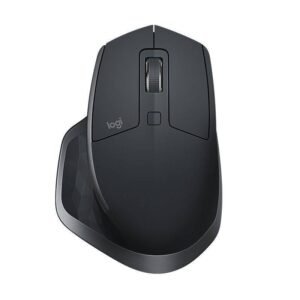
Logitech MX Master 4 Wireless Mouse Full Specifications and Price in Kenya
The Logitech MX Master 4 wireless mouse has emerged as a notable addition to the widely acclaimed MX Master lineup, which has garnered a reputation for its exceptional performance and ergonomic design. Released in late 2023, the MX Master 4 builds upon the strengths of its predecessors, introducing enhanced features aimed at meeting the demands of professionals and enthusiasts alike. This latest model showcases Logitech’s commitment to innovation in the realm of productivity peripherals.
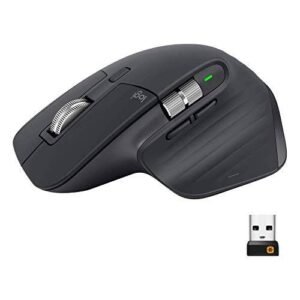
One of the most distinguishing attributes of the MX Master 4 is its refined ergonomic design, which caters to prolonged use without discomfort. The mouse is designed to provide a natural hand position, reducing strain during extensive work sessions. Additionally, the textured grip ensures a secure hold, allowing users to navigate seamlessly through various tasks with precision. The overall aesthetics have also evolved, offering a modern look that appeals to users who appreciate both form and function.
In terms of functionality, the MX Master 4 boasts advanced tracking capabilities with Logitech’s Darkfield technology, enabling it to function on virtually any surface, including glass. The upgraded scroll wheel features hyper-fast scrolling, making it easier for users to navigate lengthy documents or web pages. Furthermore, users can customize buttons to tailor the device to their specific needs, providing a personalized experience that enhances productivity.
In comparison to its predecessors, the MX Master 4 offers improved battery life and connectivity options, supporting multi-device pairing via Bluetooth and the Logitech Unifying Receiver. This versatility allows users to switch effortlessly between devices, ensuring a fluid workflow in a multi-tasking environment. Overall, the Logitech MX Master 4 stands as a testament to the brand’s dedication to creating innovative solutions that enhance productivity and user experience.
Ergonomic Design and Comfort
The Logitech MX Master 4 Wireless Mouse features a meticulously crafted ergonomic design aimed at maximizing user comfort during extensive usage. Its shape is uniquely contoured to fit the natural curve of the hand, providing support in areas often straining with prolonged mouse use. This thoughtful design choice can significantly reduce the risk of developing repetitive strain injuries, making the MX Master 4 a favorable option for both professionals and casual users.
In addition to its ergonomic form, the button placement on the MX Master 4 is strategically designed to streamline workflow. The thumb area hosts customizable buttons, allowing users to access frequently utilized functions without excessive finger movement, which can often lead to discomfort. Such layout not only enhances functionality but also minimizes the need for users to stretch their fingers awkwardly, thus fostering an overall more relaxed user experience.
The materials used in the construction of the MX Master 4 also contribute to its comfort. The soft-touch surface feels pleasant against the skin while offering a secure grip. This tactile quality ensures that, despite extended periods of use, users do not experience the slipperiness or discomfort that can sometimes accompany other mice. Furthermore, feedback from users highlights a noticeable reduction in fatigue associated with daily computing tasks when using this mouse, underscoring its effectiveness in promoting a comfortable working environment.
Ultimately, the combination of ergonomic design, optimal button placement, and high-quality materials makes the Logitech MX Master 4 an ideal choice for anyone who prioritizes comfort. This mouse not only fits seamlessly into a user’s hand but also elevates productivity by allowing for extended use without discomfort.
Advanced Features and Customization Options
The Logitech MX Master 4 Wireless Mouse is designed to enhance productivity through its suite of advanced features and customization options. One of its most notable attributes is the customizable buttons. Users can tailor these buttons to suit their workflow, such as assigning specific functions or creating shortcuts for frequently used applications. This level of personalization allows for a more efficient use of time, as tasks that often require multiple clicks can be completed with a single button press.
Another key feature is the gesture support that the MX Master 4 provides. This functionality allows users to perform various actions – such as scrolling through pages or switching between applications – simply by moving the mouse in certain directions. This intuitive control can significantly reduce the time spent on repetitive tasks, enabling a smoother workflow. By mastering these gestures, users can navigate their digital environment with greater ease and efficiency.
The unique scroll wheel of the MX Master 4 also merits attention. Its precision scroll mode allows for both hyper-fast and precise scrolling options, adapting to the requirements of different tasks. Whether shifting through lengthy documents or adjusting intricate designs, this feature empowers users to maintain focus and momentum in their work. Furthermore, the ability to switch between these modes intuitively enhances user comfort and usability.
To maximize these features, the Logitech Options software plays a crucial role. This tool provides an interface for customizing the mouse’s functionality according to individual preferences. Through the software, users can manage their button assignments, set up gestures, and even modify scroll settings, tailoring the device to fit their unique needs. The integration of these advanced features and customization options in the Logitech MX Master 4 substantially contributes to improved productivity, making it an indispensable tool for professionals seeking to optimize their efficiency.
Performance: Precision and Speed
The Logitech MX Master 4 Wireless Mouse is engineered to deliver exceptional performance, crucial for maximizing productivity in professional environments. At the core of its functionality is its precise sensor and adjustable sensitivity levels, ranging from 200 to 8,000 DPI. This wide DPI range allows users to serve various needs, whether they require swift movements for large screens or finer precision for intricate tasks. The scroll wheel is seamlessly integrated with an electromagnetic system, providing hyper-fast scrolling, allowing users to navigate lengthy documents or web pages with ease.
One of the standout features of the MX Master 4 is its superior tracking capabilities. It employs Logitech’s Darkfield sensor technology, which enables it to function accurately on virtually any surface, including glass. This versatility sets it apart from many other mice that struggle on reflective or uneven surfaces. This means users can maintain their workflow without being impeded by their working environment, maximizing efficiency in diverse conditions.
Battery life in the MX Master 4 is another compelling factor, tailored to support long-term use without frequent recharging interruptions. A full charge can last up to 70 days, depending on usage, and a quick charge feature allows for three hours of use from just a one-minute charge. This effective battery management positions the MX Master 4 as a reliable choice for professionals on the go, contrasting with other high-end mice that may necessitate more frequent charging. Overall, the performance attributes of the Logitech MX Master 4, including its sensitivity, tracking efficiency, and impressive battery life, render it a powerful tool for enhancing productivity in any setting.
Connectivity and Multi-Device Support
The Logitech MX Master 4 Wireless Mouse offers versatile connectivity options that adapt to the multifaceted needs of modern professionals. Users have the choice of connecting via Bluetooth or utilizing the included USB receiver, enabling compatibility with a range of devices, from laptops and desktops to tablets. The seamless integration of these connectivity methods ensures that users can quickly switch between different setups without disruption.
One of the standout features of the MX Master 4 is its robust support for multi-device functionality. This capability allows users to connect and control up to three devices simultaneously, enhancing workflow efficiency for those who operate across multiple systems. With just the press of a button, users can effortlessly toggle between devices such as a personal laptop, work desktop, or tablet, streamlining the process of managing tasks across platforms.
This multi-device support is particularly beneficial for professionals who often find themselves juggling different environments. For instance, an individual might use their MX Master 4 to navigate on a work computer during the day and switch to a personal device at home in the evening. This flexibility not only saves time but also reduces the need for multiple input devices cluttering the workspace. Additionally, the ability to share the same mouse across various devices maximizes productivity while minimizing effort—ideal for freelancers and remote workers who frequently shift between different devices.
In conclusion, the Logitech MX Master 4’s connectivity options and multi-device support make it a valuable tool for anyone seeking to improve their productivity. By providing seamless switching capabilities and robust connectivity, this mouse empowers users to maintain focus and efficiency across their various tasks.
User Experiences and Reviews
The Logitech MX Master 4 Wireless Mouse has garnered a wide range of user experiences and reviews since its launch. Many professionals, particularly in creative and administrative fields, have praised its ergonomic design, which seems to accommodate long working hours without causing discomfort. Users frequently note that the sculpted shape of the mouse allows for a natural wrist posture, thereby reducing strain during extensive usage. Additionally, its advanced tracking technology, capable of functioning on various surfaces—including glass—has received positive feedback, enabling smooth navigation in diverse workspace environments.
Another highlight that users emphasize is the customizability features of the MX Master 4. Many appreciate the ability to program buttons and customize gestures, optimizing the functionality according to individual preferences and workflows. This flexibility is particularly valued by graphic designers and video editors, who often have specialized commands they wish to streamline. Furthermore, the mouse’s connectivity options, including Bluetooth and a Unifying Receiver, have been seen as advantages that enhance versatility and ease of use across multiple devices.
Overall, the Logitech MX Master 4 Wireless Mouse has established itself as a favored tool among many users, balancing its strengths and weaknesses. The amalgamation of positive testimonials and some criticisms offers a comprehensive view of its performance and suitability for various tasks.
Comparison with Previous Models
The Logitech MX Master 4 represents a noteworthy evolution in the company’s wireless mouse lineup, particularly when examined alongside its predecessors, the MX Master 3 and the MX Anywhere series. These previous models set a strong foundation with their ergonomic designs, versatile features, and exceptional performance. However, the MX Master 4 introduces several enhancements that may influence users’ decisions regarding an upgrade.
One of the most significant differences lies in the MX Master 4’s advanced sensor technology. While the MX Master 3 boasted a high precision sensor, the MX Master 4 improves upon this with an even greater DPI range, offering users more responsiveness and precision when navigating various surfaces. This upgrade is particularly beneficial for professionals engaged in design or precision tasks, where even the slightest adjustments can impact outcomes.
In terms of design, the MX Master 4 maintains the familiar ergonomic shape of its predecessor while incorporating improved materials for a more comfortable grip during extended usage. The aesthetics have also received a refresh, with new color options that may appeal to a broader audience. With its optimized button placement and weight distribution, the MX Master 4 enhances usability, especially for users accustomed to the MX Master 3.
Battery life is another critical aspect where the MX Master 4 shines. While the MX Master 3 offered substantial battery life, the MX Master 4 extends this, boasting up to 70 days on a single charge, which reduces the frequency of interruptions. Additionally, the USB-C charging port remains for convenience, reminiscent of the MX Anywhere series, which highlights Logitech’s commitment to user-friendly technology.
Taken together, these advancements suggest that the upgrade to the MX Master 4 could be worthwhile for many users. Those heavily reliant on their mouse for productivity, especially professionals who require enhanced features and performance, may find the improvements compelling enough to warrant a transition from earlier models.
Best Use Cases for the MX Master 4
The Logitech MX Master 4 Wireless Mouse stands out as a versatile tool suited for various tasks, significantly enhancing productivity across multiple domains. First and foremost, in the realm of graphic design, the MX Master 4’s high-precision tracking allows designers to manipulate intricate designs and detailed graphics with ease. The customizable buttons enable quick access to frequently used tools in programs like Adobe Photoshop or Illustrator, streamlining the workflow and reducing the time spent navigating through menus.
In gaming, the MX Master 4 shines as well, particularly for strategy or simulation games where quick reflexes and precision are paramount. While it may not replace a gaming mouse for fast-paced shooters, its ergonomic design reduces fatigue during long gaming sessions, allowing gamers to maintain focus and performance without discomfort. The customizable settings can be tailored for in-game actions, providing an edge in competitive scenarios.
Programming is another area where the MX Master 4 excels. Developers benefit from the mouse’s ability to manage multiple screens seamlessly. Its advanced multi-device capabilities allow for smooth transitions between different computers or devices—ideal for those who juggle between code repositories or development environments. This flexibility can enhance coding efficiency, enabling programmers to debug or write code with minimal interruptions.
Finally, for general office work, the MX Master 4 is a perfect companion. The efficient workflow features, such as the horizontal scroll wheel and customizable gesture buttons, significantly improve multitasking capabilities. Email navigation becomes smoother, document editing is streamlined, and the overall experience of managing daily tasks is elevated. Whether handling spreadsheets or presentations, the MX Master 4 provides the comfort and precision necessary for productive office work.
Conclusion and Final Thoughts
In evaluating the Logitech MX Master 4 Wireless Mouse, it is evident that this advanced input device is designed with productivity at its core. With its ergonomic design, multiple customizable buttons, and seamless connectivity, the MX Master 4 addresses the diverse needs of users, from professionals to casual computer users. The mouse’s ability to work across multiple devices enhances efficiency, making it an exemplary choice for multitaskers who require precision and speed in their work.
The battery life of the MX Master 4 is another pivotal feature that stands out. Users can enjoy extended periods of use without the constant need for recharging, which is particularly advantageous for those who are frequently on the go or tend to forget to charge their devices. Additionally, the high-precision sensor ensures smooth tracking on various surfaces, reaffirming Logitech’s commitment to quality and performance.
Customization options also play a significant role in boosting productivity. The Logitech Options software allows users to tailor their mouse settings to suit individual workflows, whether that includes assigning specific functions to buttons or creating application-specific profiles. This level of personalization contributes to an enhanced user experience and allows for a more efficient workflow tailored to personal preferences.
Ultimately, the Logitech MX Master 4 Wireless Mouse is a worthwhile investment for those looking to elevate their productivity. Whether you are a creative professional, a programmer, or simply someone who spends substantial time on computer tasks, this mouse offers the perfect blend of comfort, functionality, and innovative features. For potential buyers, the decision should weigh their specific needs, but the MX Master 4 undoubtedly remains a leading option in the realm of productivity-enhancing tools.
There are no reviews yet.