Product details
Microsoft Surface Arc Mouse Price in Kenya
The Microsoft Surface Arc Mouse represents a significant advancement in the design and functionality of computer peripherals. Targeted primarily at users who seek portability without sacrificing performance, this device combines aesthetics, innovation, and user-friendly features that cater to a wide range of computing environments. Its unique design not only appeals to tech enthusiasts but also to professionals who value both form and function.
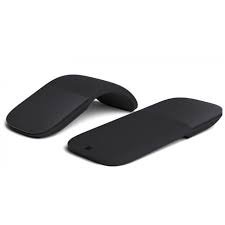
One of the standout features of the Surface Arc Mouse is its distinctive, minimalist profile that can be effortlessly flattened for transport. This makes it an excellent choice for those who frequently travel or work in mobile settings. By conforming to the natural curvature of the hand, the mouse offers ergonomic comfort, promoting ease of use during prolonged periods. This balance of design and usability positions the Surface Arc Mouse as a compelling option among its counterparts in the market.
Moreover, the mouse is built with advanced Bluetooth technology, allowing seamless connectivity with various devices, from laptops to tablets. Its compatibility with multiple operating systems enhances its versatility, making it an ideal peripheral for users who work across different platforms. The Surface Arc Mouse is particularly recommended for individuals who prioritize a clutter-free workspace, as it negates the need for additional dongles or cables.
In summary, the Microsoft Surface Arc Mouse is not just a peripheral; it is a statement of modern design and thoughtful usability. With its innovative features, it serves as a testament to Microsoft’s commitment to enhancing the user experience in a tech-driven world. As we delve deeper into this guide, we will explore its key features, design intricacies, and overall user experience, offering insights for prospective buyers and tech enthusiasts alike.
Unique Design Features
The Microsoft Surface Arc Mouse is distinguished by its innovative and contemporary design, which seamlessly merges aesthetic appeal with functionality. One of the most notable elements of its design is its unique, curved shape that allows for a comfortable grip, making it ergonomic for extended use. This arc shape not only supports the hand’s natural posture but also enables effortless control, whether you are navigating through documents or browsing the web.
Lightweight and portable, the Surface Arc Mouse is designed with modern mobility in mind. Weighing in at just under 200 grams, it provides a perfect solution for users on the go. This portability is further enhanced by its ability to flatten, making it easy to slip into a bag or carry in hand without adding unnecessary bulk. This aspect of design is particularly appealing to professionals and students who use the device during travel or while commuting.
The materials utilized in the construction of the Surface Arc Mouse contribute significantly to both its durability and its visual appeal. The exterior is crafted from high-quality materials that impart a premium feel, while also ensuring that the mouse remains resilient against wear and tear. The smooth, matte finish coupled with the sleek curves not only looks stunning but also enhances grip during use, preventing slips. Furthermore, the range of available colors allows users to select a model that perfectly fits their personal style, making the mouse not just a functional tool, but also a fashionable accessory.
In summary, the design of the Microsoft Surface Arc Mouse sets it apart from conventional mice, providing a combination of elegance and practicality that meets the demands of modern users.
Ergonomics and Comfort
The Microsoft Surface Arc Mouse is designed with an emphasis on ergonomics, which is a critical factor for users who require extended periods of use without discomfort. The overall shape of the mouse promotes a natural hand position that aligns well with the user’s anatomy, effectively minimizing strain on the wrist and fingers. This design principle is essential for preventing repetitive strain injuries, which can occur with prolonged computer use.
The mouse features a unique arc shape that allows it to conform comfortably to the user’s palm. When the mouse is in its flattened state, it provides a sleek profile that is easy to travel with, yet when arched, it supports the hand in a relaxed posture. This two-stage functionality enhances the usability by blending aesthetics with comfort, making it a versatile choice for various environments, be it a home office or professional workspace.
In addition, the Surface Arc Mouse employs a lightweight design that contributes to minimizing fatigue during long sessions of operation. The materials used are selected to provide a pleasant tactile experience, further enhancing the comfort level. The placement of buttons is also crucial; they are positioned in a way that allows easy access without forcing the user’s fingers into unnatural positions. Such considerations highlight the Surface Arc Mouse’s commitment to ergonomic excellence.
Moreover, the ability of the mouse to adapt to multiple hand sizes through its adjustable design makes it accessible to a wider range of users, ensuring that comfort is not compromised regardless of the user’s hand shape. This user-centric design is a significant factor in making the Surface Arc Mouse a preferred choice among users who prioritize both functionality and comfort in their computing accessories.
Wireless Connectivity and Compatibility
The Microsoft Surface Arc Mouse is equipped with advanced wireless connectivity options that enhance the user experience with reliable performance. This innovative mouse utilizes Bluetooth technology, making it a convenient choice for users who prefer a wireless setup. The seamless Bluetooth pairing process allows users to connect the mouse to their devices easily, whether it be a laptop, tablet, or desktop. Users simply need to activate Bluetooth on their device, then press the on/off button on the mouse to initiate the pairing process.
In terms of compatibility, the Surface Arc Mouse is designed to work seamlessly across various operating systems, including Windows, macOS, and even some Linux distributions. This wide-ranging compatibility ensures that users can enjoy the functionalities of the mouse regardless of the system they’re operating on. Moreover, the Surface Arc Mouse is compatible with Surface devices, which can provide an enhanced experience due to optimizations made specifically for them.
One of the distinct advantages of using the Surface Arc Mouse is its ability to remember previously paired devices, simplifying the switching process. Should a user frequently alternate between multiple devices, they can do so without the hassle of repeated pairing. Additionally, the mouse supports a significant wireless range, providing users with the freedom to work at a distance without worrying about connectivity interruptions.
Overall, the wireless connectivity and compatibility options of the Microsoft Surface Arc Mouse contribute significantly to its versatility. The easy Bluetooth connection, along with its broad spectrum of supported operating systems, ensures that this mouse can fit into various workflows and enhance productivity for users across different platforms.
Performance and Responsiveness
The Microsoft Surface Arc Mouse is engineered to provide an exceptional user experience, characterized by its commendable tracking capabilities and prompt responsiveness. Its advanced touch technology enables smooth navigation, making it a suitable device for various tasks, from everyday office work to more demanding creative projects and even casual gaming.
In terms of tracking capabilities, the Surface Arc Mouse exhibits impressive performance across different surfaces. Users have reported consistent tracking on both smooth and slightly textured surfaces, ensuring that cursor movement is accurate and fluid. The precision of the mouse enhances productivity in office tasks, such as editing documents and managing spreadsheets, where the need for fine cursor control is paramount.
Moreover, the responsiveness of the Microsoft Surface Arc Mouse stands out due to its minimal latency. When performing tasks that require quick and accurate inputs, such as graphic design or digital art, users can rely on the mouse’s swift reaction time. This feature is particularly important for professionals who require immediate feedback from their input devices to maintain their workflow efficiency.
While the Surface Arc Mouse is not specifically designed for high-intensity gaming, it still delivers satisfactory performance for casual gamers. Users can enjoy a range of games without feeling hindered by the mouse’s performance, as it provides adequate speed and responsiveness suitable for most gaming experiences. However, for competitive gamers, a more specialized device may be preferable.
In conclusion, the Microsoft Surface Arc Mouse offers a blend of reliability and performance that caters to a broad audience. Whether it is for productivity, creative tasks, or leisure activities, its performance and responsiveness make it a versatile choice among users looking for a capable and elegant pointing device.
Battery Life and Power Management
The Microsoft Surface Arc Mouse relies on a single pair of AAA batteries to function, making it an efficient and portable accessory for users who require flexibility and convenience in their computing tasks. In terms of battery life, the Surface Arc Mouse generally offers an impressive longevity of up to 15 months, depending on individual usage patterns. This extended battery life is particularly advantageous for users who frequently work on the go, reducing the need for constant battery replacements.
To optimize power management, the Surface Arc Mouse includes a built-in power-saving feature that activates the device’s sleep mode after a period of inactivity. This automatic feature conserves energy and prolongs the overall battery life, ensuring that the mouse is ready for use when needed. Users can easily awaken the mouse with a simple click, restoring full functionality without any delays.
The choice of AAA batteries not only contributes to the lightweight design of the Surface Arc Mouse but also enhances the overall user experience by making it easy to find replacements. This design decision aligns with Microsoft’s commitment to providing reliable and user-friendly devices. Additionally, the low-power Bluetooth technology employed in the Surface Arc Mouse ensures minimal battery usage during its operation, thereby further extending the life of each battery installed.
Overall, the combination of efficient battery consumption and robust power management features makes the Microsoft Surface Arc Mouse a reliable choice for both casual and professional users. Its thoughtful design allows users to focus on their tasks without the frequent disruptions associated with battery issues, ultimately leading to a more seamless user experience.
User Experience and Customer Feedback
The Microsoft Surface Arc Mouse has garnered a significant amount of attention from users since its release, with reviews highlighting both positive and negative aspects of its design and functionality. Many customers appreciate the mouse’s innovative, foldable design, which not only adds a modern aesthetic but also makes it highly portable. Users often find it convenient for travel and daily commutes, as it fits easily in bags and purses.
Feedback commonly centers around the mouse’s unique shape, which is designed to fit the hand comfortably. However, opinions vary on whether the ergonomic benefit is sufficient for prolonged use. Some users report discomfort during extended periods of usage, leading to minor strain on the wrist. This concern seems particularly pertinent for individuals who spend long hours working on a computer, suggesting that while the design is sleek, it may not suit everyone’s ergonomic needs.
Another focal point in user feedback is the functionality of the touch-sensitive surface. It allows for smooth scrolling and easy navigation, which has received praise from many users. However, others have noted that the sensitivity can be overly responsive at times, leading to inadvertent actions when using the mouse. This inconsistency may affect user experience, especially for those who prefer a more tactile and controlled interface.
In terms of battery life, users generally report satisfactory experiences, highlighting the convenience of long-lasting power. Overall, while the Microsoft Surface Arc Mouse has its strengths such as portability and stylish design, potential buyers should consider their specific needs and use cases to determine if the mouse is the right fit for them.
Comparison with Other Similar Devices
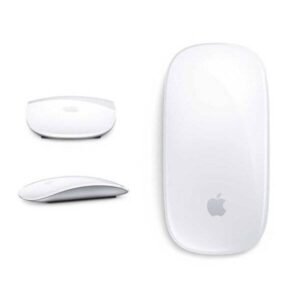
The Microsoft Surface Arc Mouse is a unique offering in the realm of computer peripherals, particularly focusing on portability and innovative design. When compared to traditional mice, such as the Logitech M720 Triathlon or the Apple Magic Mouse, the Surface Arc Mouse distinguishes itself with its distinct shape and foldable form factor. The Arc Mouse’s sleek design not only provides aesthetic appeal but also makes it highly portable, allowing users to carry it effortlessly in a laptop bag.
One of the most notable advantages of the Surface Arc Mouse is its touch-sensitive scroll area, which allows for fluid and seamless scrolling experiences. In doing so, it offers a different user interaction compared to the well-established scroll wheel found in most traditional models. However, this feature may require an adjustment period for users accustomed to conventional mice.
In terms of ergonomic design, the Surface Arc Mouse faces competition from ergonomic mice such as the Logitech MX Vertical, which is designed to promote a natural handshake position to reduce wrist strain. While the Arc Mouse is stylish and compact, it might not provide the same level of comfort for users who spend extended hours on their devices. Therefore, for those prioritizing ergonomics, traditional or dedicated ergonomic mice may be more suitable.
Another area of comparison is the battery life. The Surface Arc Mouse, which uses Bluetooth for connectivity, offers a decent battery lifespan. However, it falls short when compared to some competitors that provide rechargeable options with longer-lasting batteries. Despite this, the convenience of replacing batteries can be considered beneficial for users who prefer not to wait for devices to charge.
In summary, while the Microsoft Surface Arc Mouse stands out in design and portability, its performance and ergonomics offer both strengths and weaknesses when placed alongside other popular mice in the market. Users must weigh these factors based on their personal preferences and usage patterns to select the best fit for their requirements.
Conclusion and Recommendations
The Microsoft Surface Arc Mouse exemplifies a significant advancement in portable computing accessories, combining elegance with functionality. Throughout this guide, we explored its distinctive features, innovative design, and user experience, highlighting what sets it apart in the crowded market of wireless mice. The curved and portable design allows for ease of transportation, making it an excellent choice for users who are often on the go.
The Surface Arc Mouse is equipped with advanced Bluetooth technology, ensuring a seamless connection with various devices. Users appreciate its touch-sensitive scrolling feature, which is both intuitive and efficient, allowing for smooth navigation through documents and web pages alike. The aesthetic appeal, coupled with a range of colors, allows users to express their individuality while benefiting from a high-quality accessory.
When considering potential use cases, the Microsoft Surface Arc Mouse is ideal for professionals who require a reliable and stylish companion while traveling or working in different environments. It is also particularly beneficial for users with limited desk space, such as those using laptops in coffee shops or co-working spaces, where every inch counts.
However, it is essential to note that the Surface Arc Mouse may not be suitable for everyone. Users seeking a traditional ergonomic design or those who rely on advanced gaming features might find it lacking. Furthermore, frequent users may desire a rechargeable option rather than the AAA battery setup.
In summary, the Microsoft Surface Arc Mouse stands out as a functional yet stylish tool for various computing needs. Its unique form factor and features make it a commendable choice, particularly for casual users and professionals alike. For anyone looking for a blend of practicality and design in a wireless mouse, the Surface Arc Mouse presents a valuable option in today’s market.